 Sign In
APA Title Page: A Complete Guide for Students and Professionals
An APA title page is the cover page of a paper written in APA Style. It tells readers what the paper is called, who wrote it, and where the work was done. The APA 7th edition title page has two versions: a student title page for class assignments and a professional title page for journal submissions. This guide covers the APA format title page in both versions, with examples, a copy-ready template, and checklists.
Quick Answer
Student format: for class papers. Add the page number, a bold centered title, your name, your department and school, the course, the instructor, and the due date. No running head.
Professional format: for journal submissions. Add a running head, the page number, the title, author names, affiliations, and an author note. No course details.
Not sure which one? Use the student format for class assignments. Use the professional format for journal submissions, or if your instructor asks for it.
Layout: double spaced, 1-inch margins, title three or four lines from the top. The cover page is page 1.
Formatting a thesis, dissertation, or journal manuscript in APA? Choose an editor who knows APA 7 to check your formatting and citations along with the writing.
What Goes on an APA Title Page? Student vs. Professional
Both formats share four elements, and each adds a few of its own. Use this table to check which ones your paper needs.
| Element | Student Paper | Professional Paper |
|---|---|---|
| Page number | Upper right | Upper right |
| Running head | Not required | Required (upper left, 50 characters or fewer) |
| Bold, centered title | Required | Required |
| Author name | Required (no titles or degrees) | Required (no titles or degrees) |
| Department and school, or workplace | Required | Required |
| Course number and name | Required | Not included |
| Instructor name | Required | Not included |
| Due date | Required | Not included |
| Author note | Not required | Required |
Why Does APA Have Two Title Page Formats?
APA 7th edition, released in 2019, split title pages into student and professional versions. Before that, one set of rules covered everyone. Students had to copy journal conventions like the running head. The 7th edition made student papers simpler and kept the full set of elements for journal submissions.
Many guides online still describe the 6th edition. If a source says a student paper needs a running head, it's out of date. Pick your format by purpose. Use the student version for anything you hand to an instructor. Use the professional version for anything you send to a journal.
Elements That Appear on Both Formats
Four elements appear on every title page, whichever format you use. Set these up first.
1. Page Number
Put the number 1 in the upper right corner of the header. The title page is page 1, and every page after it gets a number.
2. Title of the Paper
The title of the paper goes in the upper half of the page, not the middle. Follow these rules.
- Start three or four lines down from the top margin.
- Center it and make it bold.
- Use title case: capitalize the first letter of each major word.
- Keep it focused. There's no word limit, but one or two lines is typical.
- Skip abbreviations and filler phrases like "A Study of."
- Leave one blank double-spaced line below it, before the author names.
3. Author Name
Write each author's name below the title. Follow these rules.
- Use first name, middle initial, and last name.
- Leave out titles and degrees. No PhD, MD, Dr., or Prof.
- Authors decide the order, usually by how much each contributed.
- For two authors, join the names with "and." For three or more, use commas with "and" before the last name.
4. Department and School, or Workplace
Write the affiliation right below the author names. Students list the department of the course and their university, separated by a comma, such as Department of Psychology, The Ohio State University.
- If all authors share one affiliation, list it once.
- If authors have different affiliations, put a superscript number after each name. Then list each affiliation on its own line with the matching number.
APA Student Title Page: Example and Checklist
A student title page adds three course details below the school name. Center them and double space them like the rest of the page.
- Course number and name. Write the course number as it appears on course materials, then a colon and the course name. For example, PSY 301: Research Methods in Psychology.
- Instructor name. Write it the way it appears on your course materials, such as Dr. Laura Chen.
- Due date. Write the date the paper is due, not the date you turned it in. Use the date format common in your country, such as October 14, 2026, in the United States.
Student papers don't need a running head or an author note. Add them only if your instructor asks.
Student Title Page Example
The two images show the same layout. The first is a plain sample, and the second labels each element.

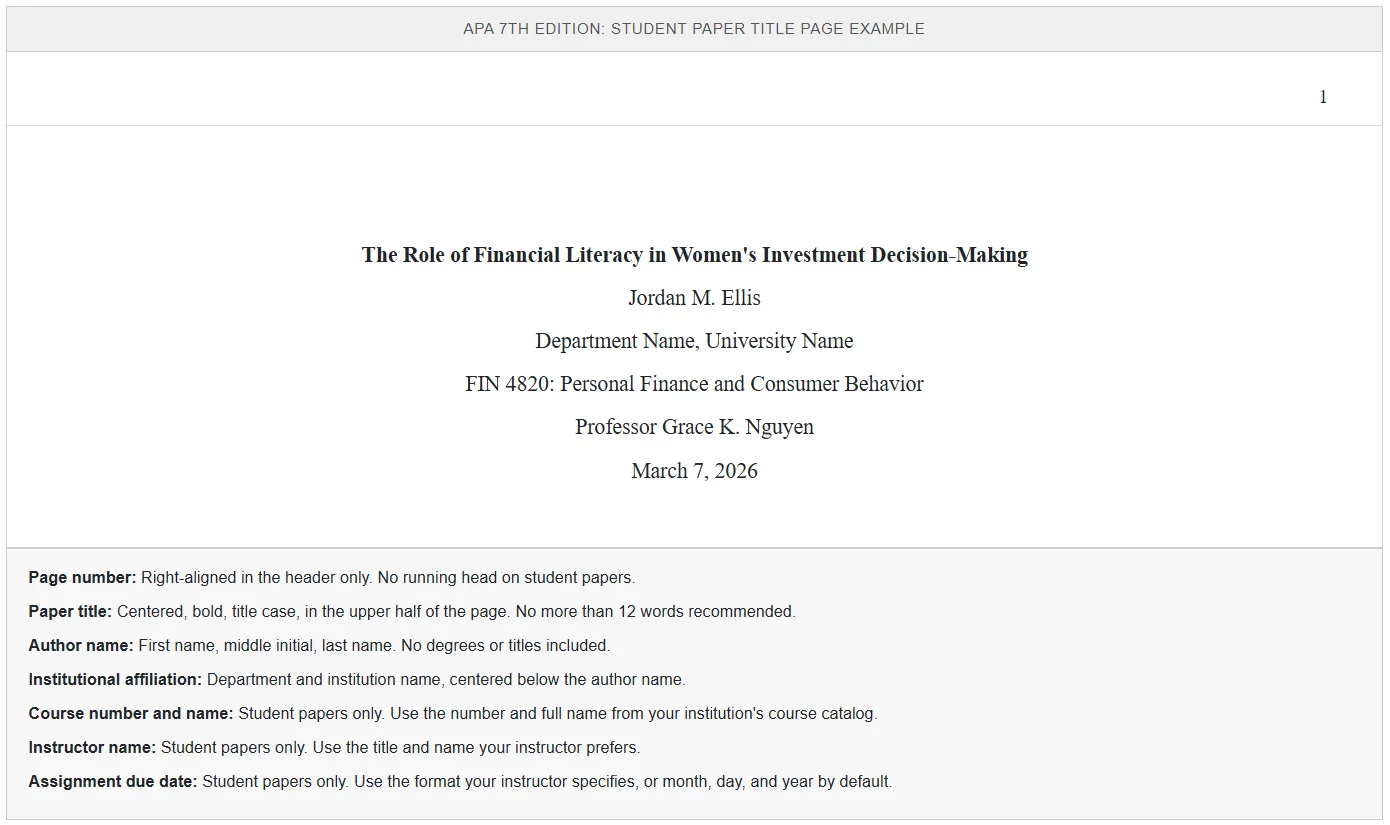
Here's the same student example as text, so you can see exactly what each line says.
Student example
1
Effects of Sleep Deprivation on Academic Performance in Undergraduate Students
Maya R. Patel
Department of Psychology, The Ohio State University
PSY 301: Research Methods in Psychology
Dr. Laura Chen
October 14, 2026
Student Title Page Checklist
Check each item from the top of the page to the bottom.
- Page number 1 in the upper right corner of the header
- Title in bold, centered, three or four lines from the top
- One blank double-spaced line after the title
- Author name (first name, middle initial, last name)
- Department and school
- Course number and name
- Instructor name as it appears on course materials
- Due date
- Every line centered and double spaced
APA Professional Title Page: Example and Checklist
A professional title page adds a running head and an author note, and it drops the course details. Use it for papers you send to a journal.
Running Head
A running head is a short version of the title that appears in the header of every page. Place it flush left in all capital letters, with the page number flush right on the same line. Keep it to 50 characters or fewer, counting spaces and punctuation. The 7th edition dropped the "Running head:" label. Our guide to the running head in APA style covers shortening long titles and setting up the header.
Author Note
The author note sits in the lower half of the title page. Center and bold the label "Author Note." Then left-align each paragraph and indent its first line. Include these paragraphs in this order, skipping any that don't apply.
- ORCID iDs. Each author's name followed by their ORCID URL.
- Affiliation changes. Note any author whose affiliation changed after the research.
- Disclosures and acknowledgments. Conflicts of interest, funding, study registration, data sharing, and thanks to people who helped.
- Contact information. The corresponding author's mailing address and email.
For more detail, see APA's blog post on author notes.
Professional Title Page Example
As with the student version, the first image is a plain sample and the second labels each element.

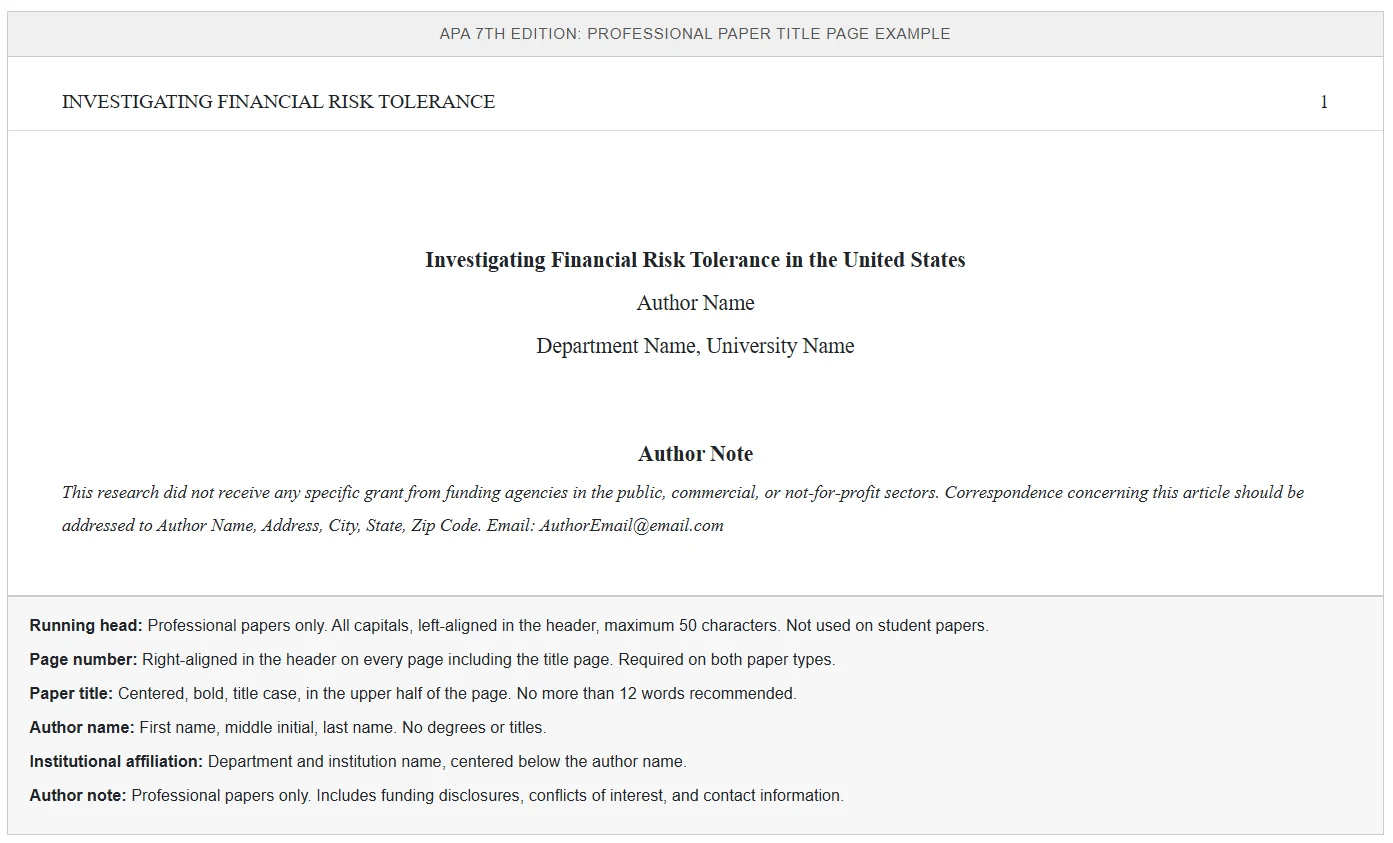
Here's the professional example as text. It shows two authors with different affiliations.
Professional example
SLEEP AND ACADEMIC PERFORMANCE
1
Effects of Sleep Deprivation on Academic Performance in Undergraduate Students
Maya R. Patel 1 and Daniel K. Brooks 2
1Department of Psychology, The Ohio State University
2School of Education, University of Pittsburgh at Johnstown
Author Note
Maya R. Patel https://orcid.org/xxxx-xxxx-xxxx-xxxx
We have no known conflict of interest to disclose.
Correspondence concerning this article should be addressed to Maya R. Patel, Department of Psychology, The Ohio State University, [mailing address]. Email: [email address]
Professional Title Page Checklist
Check each item from the top of the page to the bottom.
- Running head flush left in the header, all capitals, 50 characters or fewer
- Page number flush right on the same header line
- Title in bold, centered, three or four lines from the top
- Author names, with superscript numbers if affiliations differ
- Affiliations below the author names
- "Author Note" label centered and bold in the lower half of the page
- Author note paragraphs left-aligned with first-line indents
- Every line double spaced
Journals often add their own title page rules, such as keywords or a separate page for blind review. Our guide to creating a journal manuscript title page explains what journals ask for beyond standard APA.
APA Title Page Template You Can Copy
An APA title page template is a fill-in layout with every line in the right order. Copy the version you need, replace each bracketed item, and keep the blank line after the title. After you paste it, add the page number and any running head in the header, bold the title, and set the affiliation numbers as superscripts.
Student template
1
[Title of the Paper in Bold Title Case]
[First Name Middle Initial. Last Name]
[Department, School]
[Course Number: Course Name]
[Instructor Name]
[Month Day, Year]
Professional template
[RUNNING HEAD IN CAPITALS]
1
[Title of the Paper in Bold Title Case]
[Author One] 1 and [Author Two] 2
1[Department, Institution]
2[Department, Institution]
Author Note
[Author name] [ORCID URL]
[Affiliation changes, if any]
[Disclosures and acknowledgments]
Correspondence concerning this article should be addressed to [Author Name], [Department, Institution, mailing address]. Email: [email address]
How to Make an APA Title Page in Word or Google Docs
You can build the page in a few minutes with the settings below. Set up the page first, then type the lines.
Microsoft Word
- Set the font. Pick an accepted font, such as 12-point Times New Roman or 11-point Calibri.
- Set double spacing. On the Home tab, open Line and Paragraph Spacing and choose 2.0. Remove any extra space after paragraphs.
- Check the margins. On the Layout tab, open Margins and choose Normal (1 inch on all sides).
- Add the page number. Go to Insert, then Page Number, then Top of Page, and choose the plain number on the right.
- Add a running head (professional papers only). Double-click the header and type the running head in capitals at the left margin. The page number stays on the right.
- Type the title page. Press Enter three or four times, center the text with Ctrl+E, and type the bold title. Add a blank line, then the remaining lines. Press Ctrl+Enter to start the next page.
Google Docs
- Add the page number. Go to Insert, then Page numbers, and pick the option with numbers in the upper right.
- Set double spacing. Go to Format, then Line and paragraph spacing, and choose Double.
- Check the margins. Go to File, then Page setup, and set every margin to 1 inch.
- Add a running head (professional papers only). Click into the header and type the running head in capitals at the left margin.
- Type the title page. Press Enter three or four times, center the text with Ctrl+Shift+E, and type the bold title. Add the remaining lines below it.
General Formatting Rules for Both APA Title Pages
These rules apply to the whole title page, whichever format you use.
- Font. Use an accepted font, such as 12-point Times New Roman, 11-point Calibri, 11-point Arial, 11-point Georgia, or 10-point Lucida Sans Unicode. Use it throughout the paper.
- Spacing. Double space the whole page, with no extra space between lines.
- Margins. Set 1-inch margins on all four sides.
- Alignment. Center everything except the header and the author note. The running head sits at the left, the page number at the right, and author note paragraphs are left-aligned.
- Page count. The title page is page 1.
Six Common Formatting Mistakes
These errors come up most often on student and professional title pages.
- Adding degrees after your name. Leave out PhD, MD, MS, Dr., and Prof. in both formats.
- Centering the block in the middle of the page. The title starts in the upper half, three or four lines from the top.
- Using single spacing. Double space every line, including the author note.
- Forgetting the running head on a journal paper. Professional papers need one. Student papers don't.
- Adding course details to a journal paper. Course, instructor, and due date belong only on student papers.
- Following 6th edition rules. Student papers no longer need a running head, and the "Running head:" label is gone from professional papers.
Can You Put an Image on the Cover Page?
APA's title page guidelines don't include images or logos, so a standard APA cover page has none. The page is for information, not decoration. If your school or instructor requires a logo or a special cover, follow their template.
Official APA Resources
APA's own title page guidelines are the most direct reference for both formats. For students, the student paper setup guide walks through every setting. For journal work, APA's annotated professional sample paper shows a full manuscript with notes. The Purdue OWL APA formatting guide is also a reliable free reference. Check the journal's own guidelines before you submit.
When to Get Help with APA Formatting
A correct cover page is a good start, but instructors and reviewers judge the writing too. An editor checks grammar, clarity, citations, and APA style across the whole paper. That way your work is consistent from the title page to the reference list.
Editor World offers academic editing for students, graduate researchers, and faculty in APA, MLA, Chicago, and other styles. Every paper is edited by a native English editor, with no AI at any stage. You can choose an editor with experience in your field. Most editors offer a free sample edit of your first 300 words, with no cost or commitment.
Since 2010, Editor World has edited 145 million+ words for 8,500+ clients in 70+ countries. It's rated 5.0 / 5 on Google Reviews and 4.6 / 5 on Trustpilot.
Related APA Formatting Guides
The APA citation guide covers in-text citations, the reference list, and paper format in one place.
Our guide to the APA running head explains when you need one and how to shorten a long title.
For journal submissions, the guide to journal manuscript title pages covers what publishers add to the standard format.
If you're switching styles, APA vs. MLA format compares title pages, citations, and headers side by side.
Our guide to using et al. in citations explains how to cite works with three or more authors.
Frequently Asked Questions
What goes on a student APA title page?
A student title page has seven elements. Put the page number in the upper right corner. Then add the bold, centered title, your name, and your department and school. Below those, add the course number and name, the instructor name, and the due date. Center everything and double space it. Student papers don't need a running head or an author note.
What goes on a professional APA title page?
A professional title page has six elements. The running head sits in the upper left of the header, and the page number sits in the upper right. Below them come the bold, centered title, the author names, and each author affiliation. An author note fills the lower half of the page. It lists ORCID iDs, affiliation changes, disclosures, and contact details.
Do I need a title page for an APA paper?
Yes, in most cases. APA 7th edition includes a title page in both student and professional papers. Use the student version for class assignments unless your instructor or school asks for something different. Some instructors waive it for short assignments, so check the assignment instructions first.
Do student papers need a running head?
No. APA 7th edition dropped the running head for student papers. Only professional papers sent to journals need one. Student papers show just the page number in the upper right corner. This is one of the biggest changes from the 6th edition, which required a running head on every paper. Follow your instructor if they ask for one anyway.
Can I write "Dr." or "PhD" after my name?
No. APA doesn't use titles or degrees in the byline of either format. Write your first name, middle initial, and last name only. The one exception is the instructor line on a student paper. There, write the instructor's name as it appears on your course materials, such as Dr. Laura Chen.
Where exactly does the title go?
The title goes in the upper half of the page, three or four lines down from the top margin. Center it and make it bold. Use title case, and skip abbreviations. Leave one blank double-spaced line between the title and the author names. Don't center the whole block in the middle of the page.
What is an author note and do I need one?
An author note is a short block in the lower half of a professional title page. It lists ORCID iDs, any change in affiliation, disclosures and acknowledgments, and contact details for the corresponding author. Journal papers need one. Student papers don't, unless your instructor asks for it.
What font and font size should I use?
APA 7th edition accepts several fonts. Common choices are 12-point Times New Roman, 11-point Calibri, 11-point Arial, 11-point Georgia, and 10-point Lucida Sans Unicode. Use the same font on every page, including the title page. The title uses the same size as the body text. APA doesn't ask for a larger font.
Does the cover page count as page 1?
Yes. The cover page is page 1, and the number 1 appears in the upper right corner of the header. Every page after it is numbered in order, including the abstract, the body, the references, and any appendices. Insert the page number as a field so it updates automatically.
What does an APA title page example look like?
A student example starts with the page number in the upper right corner. The bold title sits three or four lines down, followed by a blank line. Then come the author name, the department and school, the course, the instructor, and the due date, all centered. The examples in this guide show both formats in full.
Is there an official template I can download?
Yes. APA publishes free annotated sample papers for both formats on the APA Style website, and many university libraries share Word templates. Check that any template follows the 7th edition. Older templates often put a running head on student papers, which is no longer required. The copy-ready template in this guide works in Word and Google Docs.
How do I make a title page in Google Docs?
Open Insert, then Page numbers, and pick the option that places numbers in the upper right. Set double spacing under Format, then Line and paragraph spacing. Check that margins are 1 inch under File, then Page setup. Press Enter three or four times, center the text, and type the bold title. Add the remaining lines below it.
Do all journals use the standard APA professional title page format?
No. Many journals that follow APA style add their own rules. Some want keywords or a word count on the title page. Others move the author note to a separate page for blind review. Always check the submission guidelines first. When a journal rule conflicts with standard APA format, follow the journal.
Can I use this title page format for a non-APA paper?
It's better to match the title page to your citation style. MLA papers usually skip a separate title page and use a short header on the first page instead. Chicago has its own title page layout. Using an APA title page on an MLA or Chicago paper looks like a formatting mistake to most readers.